
Voice AI is becoming a normal part of how people interact with technology. From customer service phone systems and virtual assistants to conversational AI and speech recognition software, businesses are using voice technology to make communication faster and more convenient.
But there is a challenge behind every reliable voice AI system: training data.
An AI model cannot understand human speech simply because it has a powerful algorithm. It needs examples that show it what people say, how they say it, who is speaking, and what different sounds and conversational patterns mean.
This is where audio annotation comes in.
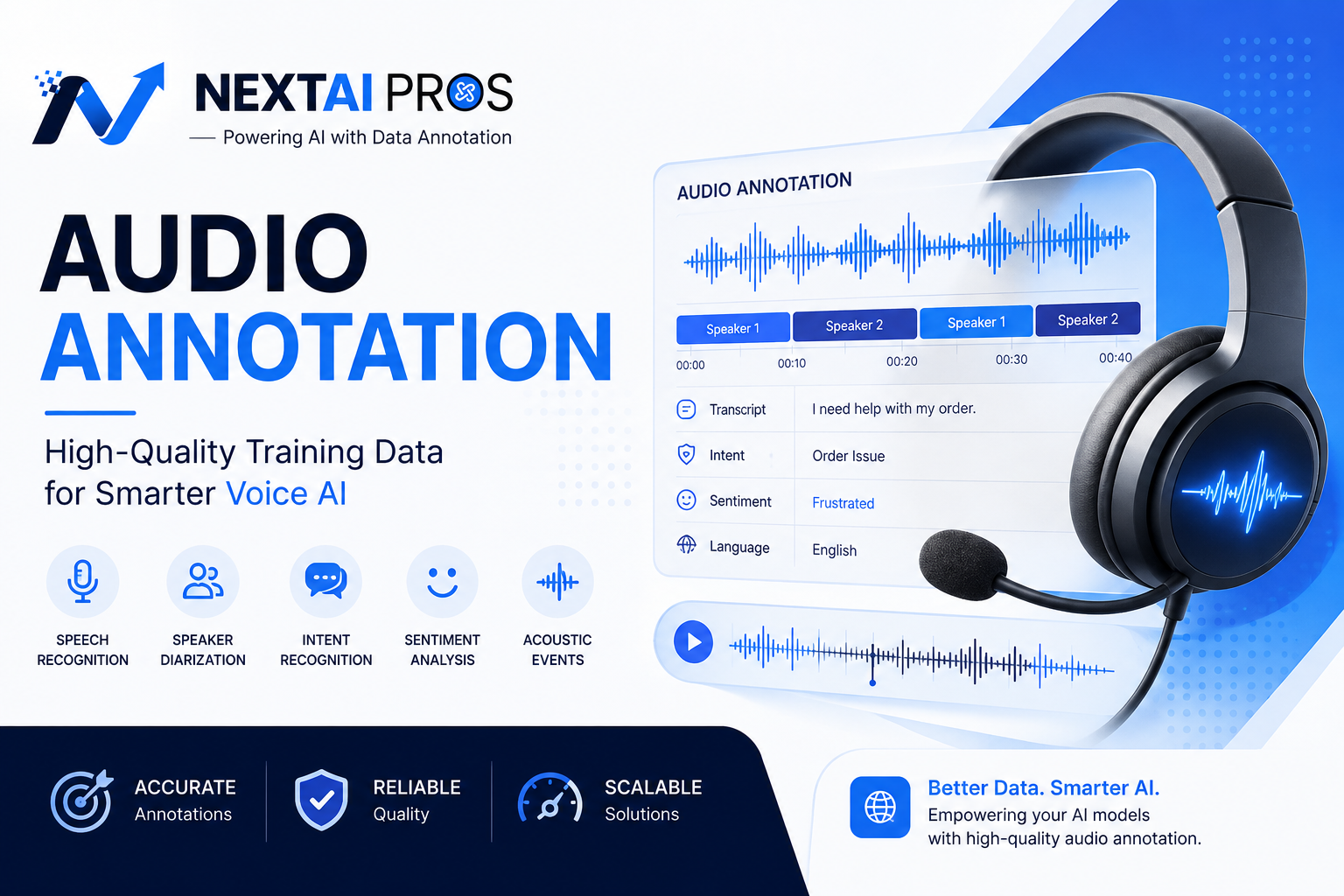
Audio annotation turns raw audio recordings into structured, labeled data that machine learning models can learn from. Depending on the project, that may include transcription, timestamps, speaker identification, intent, sentiment, emotion, background noise, and other audio characteristics.
For businesses building voice assistants, customer service bots, speech recognition systems, and conversational AI, high-quality annotated audio can provide the foundation needed to build more accurate and reliable models.
What Is Audio Annotation?

Audio annotation is the process of labeling and organizing information within audio recordings so AI and machine learning models can learn from that data.
A raw recording might contain a five-minute conversation between a customer and a support agent. A human can listen to it and understand what happened almost instantly.
An AI model needs that information to be structured.
For example, an annotated recording might identify:
- What was said
- Who said it
- When it was said
- The speaker’s intent
- The speaker’s sentiment
- Background noise
- Changes between speakers
- Language or dialect
- Specific sounds or events
Consider a customer saying:
“I still haven’t received my order.”
A transcription tells the AI what the customer said.
An annotation could add:
Speaker: Customer
Intent: Order tracking
Sentiment: Frustrated
Language: English
That additional information makes the audio much more useful as AI training data.
This is one reason data quality plays such an important role in AI development. As we explain in our guide on why data quality matters more than algorithms in artificial intelligence, even advanced models can struggle when the data behind them is inaccurate or poorly structured.
Why Is Audio Annotation Important for AI?
Speech contains much more information than words.
People communicate through tone, pauses, volume, pronunciation, speaking speed, and emotion as well as language.
Take the phrase:
“That’s fine.”
The words could indicate satisfaction.
But depending on the speaker’s tone, the same phrase could communicate frustration, sarcasm, or reluctant acceptance.
A transcript alone may miss that difference.
Audio annotation allows AI teams to capture additional information from the recording and create richer training datasets.
This can help models learn to handle real-world speech rather than only perfectly recorded and clearly spoken sentences.
High-quality audio annotation is particularly useful for:
- Speech recognition
- Voice assistants
- Customer service AI
- Conversational AI
- Call center analytics
- Sentiment detection
- Intent recognition
- Speaker identification
- Acoustic event detection
The better the training examples represent real conversations, the better prepared an AI system can be for real users.
How Does Audio Annotation Work?
A successful audio annotation project starts with the AI use case.
Before anyone begins labeling recordings, the team needs to understand what the model is supposed to learn.
1. Define the AI Use Case
A speech recognition model may need highly accurate transcription and timestamps.
A customer service voice bot may need transcription, speaker labels, intent, sentiment, and conversational context.
An acoustic recognition system may instead need labels for sounds such as alarms, vehicles, machinery, or background events.
The use case determines what should be annotated.
2. Create Annotation Guidelines
Clear guidelines are essential for consistency.
For example, if a dataset uses sentiment labels, annotators need clear definitions for categories such as:
- Positive
- Neutral
- Frustrated
- Angry
- Confused
- Urgent
Without clear instructions, two annotators could listen to the same recording and assign completely different labels.
Good guidelines provide examples and explain how difficult or ambiguous cases should be handled.
3. Annotate the Audio
The audio can then be labeled according to the project requirements.
Depending on the dataset, this could include:
- Transcription
- Timestamping
- Speaker identification
- Intent annotation
- Sentiment annotation
- Emotion labeling
- Noise classification
- Language identification
- Acoustic event annotation
4. Perform Quality Control
Quality control is one of the most important parts of the process.
Reviewers can check for:
- Incorrect labels
- Missing annotations
- Transcription errors
- Timestamp problems
- Speaker confusion
- Inconsistent classifications
A well-designed quality process helps ensure that the final dataset is consistent and ready for machine learning.
Types of Audio Annotation
Different AI applications require different types of audio annotation.
Audio Transcription
Transcription converts spoken language into written text.
For example:
Audio: “I’d like to change my appointment.”
Transcript: “I’d like to change my appointment.”
Transcription is fundamental to many speech recognition systems. Depending on the project, transcripts can also include punctuation, timestamps, speaker labels, filler words, and other details.
However, transcription only captures part of what happens in a conversation.
That is why many AI projects require additional annotation.
Timestamp Annotation
Timestamp annotation identifies exactly when speech, words, speakers, or sounds occur within an audio file.
For example:
00:02–00:05: Customer speaks
00:05–00:08: Agent responds
00:08–00:12: Customer speaks
Precise timestamps can support speech recognition, voice activity detection, keyword spotting, conversation analysis, and real-time voice applications.
Speaker Diarization
Speaker diarization answers a simple question:
Who spoke when?
In a customer service call, the system needs to distinguish the customer from the agent.
For example:
Customer: “My order hasn’t arrived.”
Agent: “Let me check the tracking information.”
Customer: “It was supposed to arrive yesterday.”
Speaker diarization gives the conversation structure and helps AI systems understand which statements belong to which speaker.
Intent Annotation
Intent annotation identifies what a person is trying to accomplish.
A customer might say:
“Can you refund this order?”
The intent could be:
Refund Request
Another customer might say:
“Where is my package?”
The intent could be:
Order Tracking
The goal is to teach AI systems to recognize the meaning behind different ways of expressing the same request.
Sentiment and Emotion Annotation
Voice can reveal emotional signals that aren’t obvious from a transcript.
Audio annotation can identify characteristics such as:
- Satisfaction
- Frustration
- Anger
- Confusion
- Urgency
- Excitement
- Neutral communication
This can be particularly valuable in customer service.
For example, an AI system could potentially identify that a customer’s frustration is increasing during a conversation and trigger an escalation to a human agent.
Acoustic Event and Noise Annotation
Not everything important in an audio recording is speech.
AI systems may also need to recognize:
- Sirens
- Alarms
- Music
- Vehicles
- Machinery
- Doorbells
- Applause
- Background conversations
Noise annotation can also identify conditions such as traffic, echo, poor microphone quality, or other environmental interference.
This helps create datasets that reflect the conditions AI systems encounter in the real world.
Audio Annotation for Customer Service and Voice AI
Customer service is one of the most practical applications of audio annotation.
Businesses generate enormous amounts of conversation data through phone calls and voice support. Those conversations can reveal customer intent, satisfaction, frustration, common problems, and opportunities to improve service.
Annotated audio can help train systems for:
Intent recognition
AI can learn to identify whether a customer needs a refund, wants to change an account, needs technical assistance, or has another request.
Sentiment detection
Annotated voice data can help models recognize emotional signals and changes in customer sentiment.
Intelligent call routing
Intent classification can help route customers to the appropriate department or agent.
Conversation analytics
AI can analyze large numbers of conversations to identify recurring questions, complaints, and customer service patterns.
Better voice bots
Voice bots need to handle natural speech, including pauses, filler words, interruptions, accents, incomplete sentences, and background noise.
Training them on realistic annotated audio can help them become more resilient outside controlled testing environments.
Why Human Annotation Still Matters
AI-assisted annotation tools can make the process faster.
Automated systems can help with transcription, segmentation, speaker detection, and preliminary labeling.
But human review remains important when the audio is ambiguous.
Consider sarcasm.
A customer says:
“Perfect. Exactly what I needed.”
The words sound positive, but the tone and surrounding conversation might indicate frustration.
A human reviewer can consider the context when making the annotation.
Human expertise is also valuable when dealing with:
- Heavy accents
- Overlapping speech
- Poor-quality recordings
- Unclear intent
- Emotional changes
- Industry-specific terminology
- Multiple languages
The most effective workflows often combine automation with human quality control.
Automation handles repetitive work, while human reviewers focus on difficult cases and consistency.
Common Challenges in Audio Annotation
Audio annotation has several challenges that need to be considered before a project begins.
Accents and dialects
A model trained on a narrow range of speakers may struggle with accents and dialects that aren’t well represented in its training data.
Overlapping speech
People interrupt each other and sometimes speak at the same time. Separating overlapping speakers can be difficult.
Poor audio quality
Background noise, echo, distortion, low volume, and compression can make transcription and annotation harder.
Emotional ambiguity
Emotion isn’t always obvious. A calm voice can hide frustration, while laughter doesn’t necessarily mean happiness.
Privacy and sensitive information
Customer conversations may contain names, phone numbers, account details, payment information, or other sensitive data.
Organizations should establish appropriate privacy, security, access, and data-handling procedures when working with real customer recordings.
Why Audio Data Quality Matters
A large dataset isn’t automatically a good dataset.
A million poorly labeled recordings may be less useful than a smaller dataset that is accurate, diverse, and consistently annotated.
High-quality audio data can help AI teams:
- Improve speech recognition
- Increase intent classification accuracy
- Reduce training errors
- Improve conversational AI
- Handle different accents and environments
- Build more reliable voice applications
This is the same principle that applies across AI development: the model can only learn from the examples it receives.
For businesses investing in AI, improving the quality of training data can therefore be just as important as selecting the right model.
Why Use Professional Audio Annotation Services?
As an AI project grows, managing annotation internally can become difficult.
A company may start with a few thousand recordings and eventually need hundreds of thousands of audio segments labeled.
At that scale, teams need to manage:
- Annotator recruitment
- Training
- Annotation guidelines
- Quality assurance
- Project management
- Data security
- Multiple languages
- Large-scale delivery
Professional audio annotation services can provide the people and processes needed to scale this work while allowing machine learning teams to focus on model development.
The right partner should understand not only how to label audio, but also why the data is being labeled and what the AI model needs to learn from it.
How NextAI Pros Helps With AI Training Data
At NextAI Pros, we believe better AI starts with better data.
Our goal is to help businesses transform raw information into structured, high-quality training data that can support real machine learning applications.
Our broader data annotation capabilities cover different types of AI data, including image, video, text, and other specialized datasets.
We also support annotation requirements for industries such as security and surveillance, where accurately labeled data can help train systems for threat detection, video analytics, people and vehicle tracking, and access control.
For audio projects, we can apply the same data-first approach to speech, voice, and conversational AI applications.
Whether you are building a voice assistant, customer service bot, speech recognition model, or conversational AI platform, the annotation process should be designed around your specific requirements.
Final Thoughts
Audio annotation is an important part of building reliable voice AI.
Raw audio contains valuable information, but machine learning models need that information to be structured before they can learn from it effectively.
From transcription and timestamps to speaker diarization, intent, sentiment, and acoustic events, audio annotation can transform recordings into useful AI training data.
For customer service, that can mean better intent recognition, smarter call routing, improved sentiment detection, and more natural conversations.
For voice AI developers, it can mean training models that are better prepared for accents, interruptions, background noise, and the unpredictable way people actually speak.
Better data leads to better AI.
If you’re developing a voice AI system, speech recognition model, conversational AI platform, or customer service automation solution, NextAI Pros can help you prepare the high-quality training data your project needs.
What is audio annotation?
Audio annotation is the process of labeling and structuring information within audio recordings so AI and machine learning models can learn from them.
What is audio annotation used for?
Audio annotation is used for speech recognition, voice assistants, conversational AI, customer service bots, call analytics, sentiment detection, speaker recognition, and other AI applications involving audio.
What is the difference between audio annotation and transcription?
Transcription converts spoken language into text. Audio annotation can include transcription but can also identify speakers, timestamps, intent, emotion, background noise, and other characteristics.
What is speaker diarization?
Speaker diarization identifies different speakers in an audio recording and determines when each person is speaking.
Why is human annotation important?
Human reviewers can handle ambiguous speech, accents, overlapping conversations, emotional cues, and other situations that automated systems may misunderstand.
Can audio annotation support multilingual AI?
Yes. Audio datasets can be annotated for different languages, accents, dialects, and regional speech patterns to support more diverse voice AI applications.
How can I start an audio annotation project?
Start by identifying what your AI model needs to learn, the type and volume of audio you have, the labels required, and your quality expectations. A professional annotation team can then design the appropriate workflow.